Tthe self-extensions feature in Library Online works as so: when a customer is warned that their session is nearly over and the station they are on does not have a booking immediately following, they are given the choice to extend their session by the following prompt:
Would you like more time on the computer today? NOTE: If you say yes and another customer books your computer, YOUR SESSION WILL END AFTER A 5 MINUTE WARNING.
When a customer says “yes” to this message, the counter on their computer is increased by 2 hours. However, this is considered “borrowed time”. If the computer the customer is on is booked, they will be given a 5 minute warning and their session will end. Extended bookings show as yellow in Timeslot Manager:
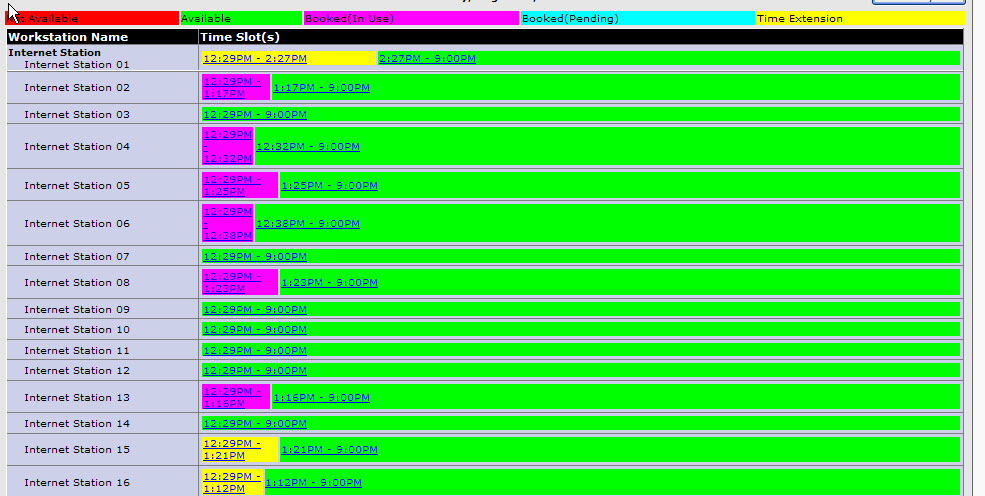
If all computers are in use and a customer books the next available computer, the person who is the furtherest into their self-extension (ie. the person who has been on a computer the longest) is given a 5 minute warning that their session will end.
If a customer requires an uninterrupted block of time in excess of 1 hour (ie. because they are writing an exam), providing an extension through the Library Online admin interface (either through Time Slot Manager or using the Extend Patron Time Limit function). Time extended in this fashion can NOT be overriden by a computer booking.